Blocked Remitters
The Blocked Remitters sub-module is a critical feature under the broader Remitters Module in the HelloMe Money admin panel. It is designed to manage, monitor, and take administrative actions on remitters who have been flagged for compliance, fraud, policy violations, or risk concerns.
🔰 Purpose and Functionality
This section centralizes all remitters who have been manually or automatically blocked by compliance or the risk system. Blocking reasons may include:
- High-risk score
- Failed KYC or PEP/Sanctions checks
- Suspicious or fraudulent transaction patterns
- Policy violations (e.g., exceeding remittance limits)
🔍 Search and Filter Options
Admins can search or filter blocked remitters using:
- From Date / To Date (blocked within a specific period)
- ID, Name, Phone, or Email
- Risk Level or Amount Blocked
- Agent/Branch (which partner or outlet originated the remitter)
📊 Data Displayed in the Grid
| Field | Description |
|---|---|
| ID | System-generated unique remitter ID |
| Block Date | Date the remitter was blocked |
| Name | Full name of the remitter |
| Address | Registered remitter address |
| Contact(s) | Phone and email of the remitter |
| Agent/Branch | Channel/agent/branch through which the user registered |
| Amount | Last known or blocked transaction amount |
| Risk | Last recorded risk level (e.g., HI = High, UA = Unacceptable) |
| Status | Typically marked as "Blocked" |
| Action | Icons for viewing profile, unblocking, or taking other actions |

When the admin clicks or hovers over the “More” button, a dropdown menu appears with quick action tools:
- ✏️ Edit User: Allows the admin to quickly update user details such as address, phone, or name without opening the full profile.
- 🔐 Change User Passcode: Allows setting or resetting the remitter’s passcode used for transaction approvals or 2FA.
- 🔑 Change User Password: Allows resetting the remitter’s portal login password if the user is locked out or requests a reset.
- 🗑️ Delete User: Removes the user from the system if flagged for deletion (this action is permission-restricted and may require confirmation).
These quick actions allow admins to manage common remitter operations efficiently directly from the list view, reducing navigation steps during:
🛠️ Available Bulk Actions (Admin Tools)
Just Like manage Remitters page, Admins can select one or more blocked remitters and perform bulk actions:
| Button | Function |
|---|---|
| Delete Selected | Removes remitters from the blocked list (note: does not restore access, only clears record visibility) |
| Export Selected to Excel | Downloads selected remitter data for offline review, audit, or compliance reporting |
| Export Profile Risk | Extracts risk-related details of selected remitters |
| Send Email to Selected | Sends email notifications (commonly used to notify blocked users of next steps or appeals) |
| Send Notification to Selected | Pushes system notifications (visible when users log into their portal/app) |
| Send SMS to Selected | Sends short text updates (e.g., “Your account has been flagged. Please contact support.”) |
📂 What Happens When You Click “Profile” on Blocked Remitter Page
When an admin clicks “Profile” on the Blocked Remitters page, it opens the full remitter profile, displaying structured, actionable data across clear tabs for effective compliance review, customer monitoring, and risk management.
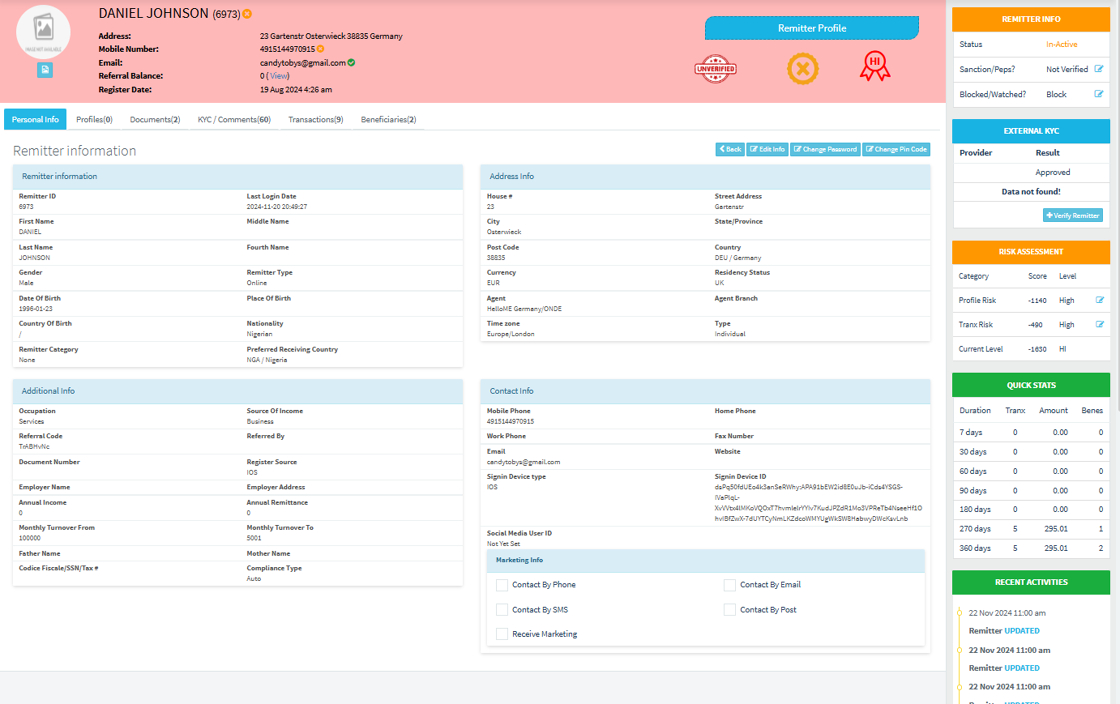
What Each Tab does
1️⃣ Personal Info Shows the remitter’s core personal details, including:
Names, date of birth, gender, nationality.
Remitter type (Individual/Business/Online/Agent).
Preferred receiving country.
Address and residency status.
Occupation, source of income, and employer details (if provided).
Referral and registration source details.
Purpose: Verify KYC information.
- Check registration data consistency.
2️⃣ Profiles
Shows any linked user profiles under this remitter, e.g., if the same person registered under different branches or identifiers.
Purpose:
- Identify duplicate or linked profiles.
- Track user identity across branches or channels.
3️⃣ Documents
Displays uploaded KYC and ID documents, including:
Passport, NIN, Driver’s license, or utility bills.
Document status (approved, pending, rejected).
Purpose:
- Review documents for compliance checks.
- Download for manual verification.
- Ensure regulatory KYC requirements are met.
4️⃣ KYC / Comments
Shows compliance notes and audit comments with timestamps, such as:
PEP/Sanction checks.
Manual KYC review outcomes.
Risk team observations.
Purpose:
- Maintain an audit trail.
- Enable collaboration across compliance teams.
- Track compliance reviews and history.
5️⃣ Transactions
Displays all transactions initiated by the remitter, including:
Transaction ID, amount, destination country, and beneficiary.
Purpose:
- Monitor user transaction behavior.
- Spot suspicious patterns for AML reviews.
- Track volume and frequency for compliance reporting.
6️⃣ Beneficiaries
Lists saved recipients (beneficiaries) under this remitter, showing:
Beneficiary names, country, and contact details.
Purpose:
- Track who the remitter is sending money to.
- Identify suspicious beneficiary patterns (e.g., many unrelated recipients).
7️⃣🛡️ Risk and Compliance Snapshot
The Risk Assessment section summarizes:
Profile risk score and transaction risk score.
Current combined risk level (e.g., HI = High).
Sanction/PEP check status.
Block/Watch status.
Compliance type (Auto/Manual).
Purpose:
- Help compliance officers decide on blocking, monitoring, or escalating the user.
- Support risk-based decision-making.
8️⃣ 📊 Quick Stats
Displays transaction and activity summaries over:
7, 30, 60, 90, 180, 270, and 360 days.
Number of transactions, total amount sent, and beneficiary count.
Purpose:
- Quickly understand the user’s transaction history at a glance.
- Spot inactive, dormant, or high-activity users.
9️⃣🕒 Recent Activities
Lists recent system and admin actions related to this remitter, including:
Profile updates.
Compliance comments added or updated.
Status changes (e.g., blocked/unblocked).
Purpose:
- Maintain a clear audit log. |
- Help teams understand previous actions taken on the user.
🪐 Summary When an admin clicks “Profile”, it allows them to:
- View and verify complete KYC details.
- Monitor transactions and behavior.
- Check risk levels and compliance status.
- Manage documents for regulatory compliance.
- Access a structured, complete audit history.
This centralizes all critical user data in one actionable view, ensuring HelloMe Money’s remittance operations remain compliant, secure, and efficient.